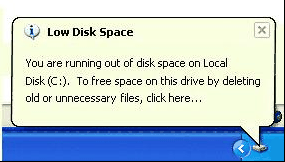
Cuando tienes problema de espacio en el disco, suele aparecer este molesto mensaje, recordandotelo. Puedes desactivarlo de esta forma:
En Inicio - Ejecutar, escribimos regedit, aceptar y seguimos la rama:
HKEY_CURRENT_USER/Software/Microsoft/Windows/CurrentVersion/Policies/Explorer
En el panel derecho hacemos clic con el ratón derecho para crear una entrada nueva.
Click en Nuevo y luego en DWORD, Ponemos el nombre NoLowDiskSpaceChecks y le ponemos valor 1. OK, salimos del regedit y reinicia para ver los cambios.


**
When you have the problem of disk space, usually appears this annoying message remember it. You can disable this:
Start - Run, type regedit, accept and follow the branch:
HKEY_CURRENT_USER / Software / Microsoft / Windows / CurrentVersion / Policies / Explorer
In the right pane we click the right mouse to create a new entry.
Click New, then DWORD, type NoLowDiskSpaceChecks name and we put value 1. OK, exit regedit and restart to see changes.
**
----------------------------------------------------------------------------